 English
  Arabic
  Chinese
  French
  Russian
  Spanish
 Abstract reviewers are the members of your scientific or programme committee who read, score and comment on submitted abstracts. On your conference site, reviewers are people who register through a Call for Reviewers, are approved by a coordinator, choose the categories they’re qualified to assess, and then score the abstracts matched to them — all from the member dashboard. This article covers the coordinator’s side: opening the call, approving reviewers, and keeping the review round on track from Administration → Reviewer Management.
The reviewer workflow at a glance
- You open a Call for Reviewers and share the link.
- Prospective reviewers register, choosing the categories they can review and giving their career stage.
- They arrive in Reviewer Management as Pending, and you Acepte or Reject each one.
- Accepted reviewers are matched to abstracts in the categories they chose.
- They score their abstracts, and you track progress to the deadline.
Opening a call for reviewers
Recruitment starts with your Call for Reviewers page. This explains what’s involved and links to the registration form. Share that link with your membership, past reviewers and committee — by email, in a newsletter, or from your conference site — so anyone willing to review can sign themselves up rather than being added by hand.
How reviewers register
Reviewers sign up through the Reviewer Registration form. As well as their name, organisation and contact details, they tell you:
- Career stage — for example early-career, mid-career or senior, so you can balance experience across the panel.
- Category selections — the conference categories (your abstract topics) they’re qualified to review. This is what later matches them to the right submissions.
- Any review preferences your conference asks for, such as study type or population focus, to sharpen the match further.
Once submitted, the reviewer appears in Reviewer Management with a status of Pending, ready for you to approve.
Approving reviewers in Reviewer Management
Go to Administration → Reviewer Management. The cards along the top give you an at-a-glance count of your panel — Total Reviewers, Pending, Accepted, Rejected y Withdrawn — and the table below lists everyone who has registered.
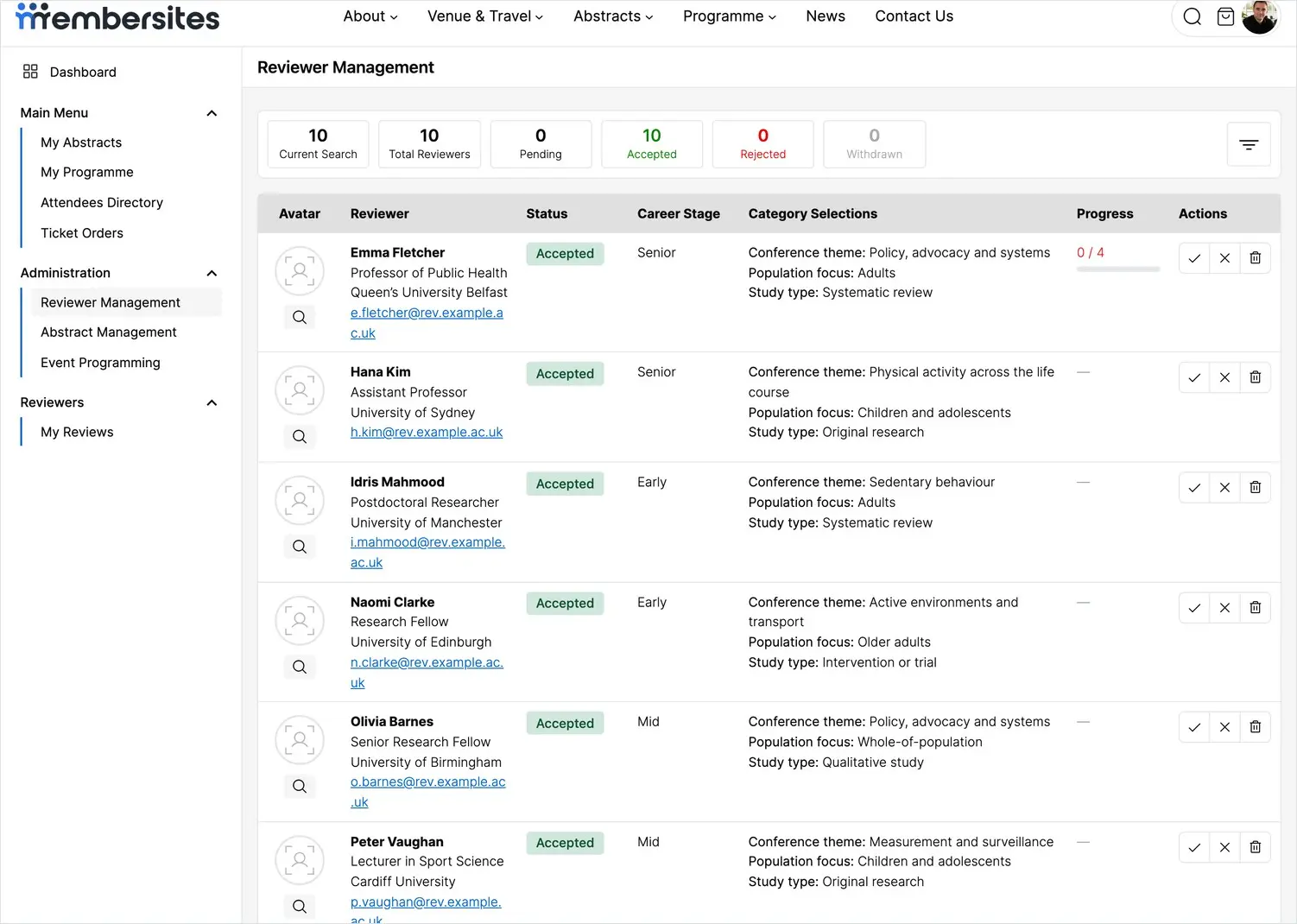
Each row shows the reviewer’s photo, name, role and organisation, their current Status, their Etapa profesional, the Category Selections they made, and their review Progress. On the right, the action buttons let you:
- Acepte (✓) — approve the reviewer so they join the active panel and can start reviewing.
- Reject (✕) — decline the application.
- Remove (🗑) — take the reviewer off the panel entirely.
Use the search and filter controls to work through a long list — for example, to show only Pending applications when you’re approving a new intake.
How abstracts reach reviewers
Each abstract is assessed by two reviewers. You allocate reviewers to abstracts from the Gestión de resúmenes screen, where every submission has a Reviewer 1 y Reviewer 2 slot. The reviewers whose category selections match an abstract’s topic are the natural choice, so you’re always placing work with people who understand it. Once allocated, an abstract appears in that reviewer’s My Reviews list. For the full detail of allocating reviewers and tracking scores, see the related article on managing abstract submissions.
Tracking review progress
En Progress column shows how far each reviewer has got — for example 6 / 9 means six of their nine matched abstracts are scored — with a bar so you can spot at a glance who’s up to date and who’s fallen behind. As the deadline nears, this is where you see who still has reviews outstanding so you can follow up before the round closes.
Reviewers and coordinators
There are two levels of access. Reviewers score the abstracts matched to them from their My Reviews area. Abstract coordinators have the wider view — the Reviewer Management and Abstract Management screens — where they approve reviewers, oversee the panel and manage the round. Promote a trusted committee member to coordinator when you want to share the administrative load.
What reviewers see
Once approved, a reviewer works entirely from My Reviews, where their matched abstracts are listed and they open each one to score and comment against your criteria. For the reviewer’s own walkthrough, see the related article on reviewing and scoring abstracts.